1300 760 441
 cs@factoryfast.com.au
Office Lighting Guide: How to Layer Task, Ambient and Accent Light
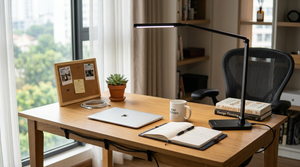

A workspace can have plenty of light and still feel difficult to use. A bright ceiling fitting may leave a notebook in shadow, while a powerful lamp placed behind a monitor can create a distracting reflection. The answer is usually not a single brighter fitting. It is a planned combination of light sources, each doing a distinct job.
This office lighting guide explains how to build that combination around the work you perform, the daylight already entering the room and the space available on or beside the desk. The goal is practical: clear light on the task, comfortable general illumination around the room and restrained accent light where it improves depth or atmosphere.
Start With the Three Layers of Office Lighting
The easiest way to diagnose a workspace is to separate its lighting into task, ambient and accent layers. Not every office needs an elaborate scheme, but every light source should have a defined purpose.
Task light serves the active work area
Task lighting is directed at the place where detail matters: a keyboard, documents, sketchbook, craft surface or reading material. A desk lamp is the most familiar example because it can place light close to the work without illuminating the entire room at the same intensity.
Choose the direction before choosing the appearance. For handwriting, position the lamp so your working hand does not cast a strong shadow across the page. For computer use, aim the light at the desktop rather than the display. A useful head or shade contains the light within the working zone instead of sending it straight towards your eyes.
If the desk is compact, browse desk lamps for focused workspace lighting with the base size in mind. The footprint matters as much as height: a lamp that consumes the only clear space beside a laptop may solve one problem and create another.
Ambient light gives the room a usable base
Ambient light is the broader, softer layer that helps the desk sit within a comfortably lit room. It may come from a ceiling fitting, daylight, a shaded floor lamp or light reflected from walls and ceilings. Its job is not to illuminate fine print by itself. It reduces the stark contrast between a bright work surface or screen and a dark surrounding room.
In a small home office, one shaded floor lamp may add enough general illumination for evening work. In a larger or darker room, several sources may be needed so that one corner is not doing all the work. Look at the room after sunset as well as during the day; the effective lighting plan must support the hours in which the office is actually used.
Accent light is optional and controlled
Accent light adds visual depth, highlights shelving or softens the background behind a screen. It can be useful in an office that also appears on video calls or shares space with a bedroom or living area. It should remain subordinate to the work light.
Coloured or decorative illumination can help define the office zone after hours, but it is a poor substitute for clear task light. Treat it as a separate layer. That allows you to switch it off when colour accuracy, paperwork or detailed work requires a more neutral environment.
The office lighting collection is the practical starting point when comparing these roles together rather than shopping by shape alone.
Audit the Room Before Adding Another Lamp
Buying first and finding a position later often leads to glare, cable clutter or a lamp that never gets used. Spend one normal workday observing the room before choosing a product.
Track daylight across the working hours
Note where direct light falls in the morning and afternoon. A window that feels helpful at one hour may reflect on the screen later. Blinds or curtains can control changing daylight, but desk orientation also matters. A side-on relationship to the window often gives you more control than placing the screen directly in front of bright glass or with intense daylight immediately behind it.
Do not plan the artificial lighting only for the darkest hour. Identify the transition point when daylight fades and the work surface becomes harder to read. A lamp with simple, accessible controls is more likely to be adjusted as conditions change.
Mark reflections and shadows at the actual seat
Sit in your usual position and switch on each existing light separately. Look for reflected bright spots on the monitor, deep shadows over paperwork and exposed globes within your normal field of view. Then turn the sources on together. Two acceptable lamps can still create a poor result when their beams overlap or point towards a glossy surface.
Test common postures, not just an upright inspection position. If you lean towards drawings, move between two screens or turn to a printer, the useful area may be broader than the centre of the desk.
Inventory surfaces, outlets and walking space
Record where a lamp could realistically sit, where it can draw power and how its cable would reach. On the desktop, trace the base footprint with paper. On the floor, check the lamp base against chair movement, drawers and the path into the room.
The previously published computer desks and tables buyer guide explains why advertised desk width is not the same as usable work area. Apply the same logic here: monitor stands, laptop docks, stationery and temporary paperwork all compete with a lamp base.
Choose the Lamp Type Around the Work, Not the Decor
Once the missing layer is clear, compare lamp formats by where they place light and what space they occupy. Style should refine a workable format, not rescue an unsuitable one.
Desk lamps suit concentrated work
An office desk lamp is usually the strongest choice for reading, writing and close-detail tasks because it sits near the work surface. Adjustable brightness is useful when the same desk supports both screen work and paper-based tasks. Directional adjustment is valuable when the active area changes during the day.
A compact format can also support flexible workstations. The current rechargeable cordless table lamp uses warm white LED light, touch dimming and USB charging. It is 28 cm high with a 9 cm base and 13 cm lamp diameter, so buyers can map its footprint precisely. Cordless use helps when a power point is poorly placed, although its warm, diffused output should be assessed against the detail level of the intended task rather than assumed to suit every desk.
Floor lamps preserve the desktop
A standing lamp is useful when the desk is already crowded, when the light needs to serve more than one nearby surface or when the room lacks a comfortable ambient layer. The trade-off moves from desktop area to floor area. Base width, shade position and cable route therefore become critical.
The in-stock mid-century tripod floor lamp measures 38 x 38 x 152 cm and weighs 2.27 kg. Its E27 holder accepts a compatible globe within the listed 60 W rating, while the globe itself is not included. That makes brightness and colour choice flexible, but it also means the buyer must budget for and select the globe separately. The three-leg base needs a clear square of floor beside the desk rather than being squeezed into a chair path.
Explore floor lamps for offices and reading areas when surface space is the constraint. A shaded design can support ambient light, but a fixed shade may not direct enough illumination onto detailed paperwork. Decide whether the floor lamp is solving general room brightness or a specific task before expecting it to do both.
Fixed and portable lights solve different problems
A plug-in lamp is well suited to a stable workstation where the cable can be routed once. A rechargeable model suits flexible desks, shared rooms and places where visible leads would interfere with the setup. Portability brings an extra ownership task: the light must be charged and returned to a consistent position.
Integrated LED products remove the need to choose a globe, while replaceable-globe lamps allow more control over the bulb’s output and colour. Neither approach is automatically better. Check whether the listing states brightness, dimming, light colour, fitting type and whether a globe is supplied. Missing information should be treated as a question to resolve, not filled with an assumption.
Position Light to Control Glare and Shadows
Lamp performance depends heavily on placement. A modest light in the correct position can be more useful than a brighter source aimed poorly.
For screens, light the surroundings and desk
Keep the brightest source out of the screen’s direct reflection path. If you can see the lamp or an exposed globe mirrored in a dark display, change its angle, height or lateral position. A shaded or diffused ambient source behind or beside the working position can brighten the room without competing with the display.
Avoid pointing a concentrated beam at the monitor. The screen produces its own light; the lamp is there to support documents, the keyboard and surrounding surfaces. If the desk serves both screen and paper work, place the beam so it can be redirected without moving the entire base.
For writing, drawing and craft work, manage hand shadows
Place the task light on the side opposite the hand that performs the detailed work. This lets the beam reach the page before your arm interrupts it. For a shared desk, a centrally positioned adjustable lamp or two individually controlled lights may work better than repeatedly moving one fixed source.
Check the shade edge from the seated position. It should conceal the most intense part of the light source while still allowing the beam to reach the work. A lamp that looks attractive from the doorway but exposes glare at seated eye level has not been planned for its primary user.
For video calls, light the face without flattening the room
Place a soft light in front of and slightly to one side of the user rather than directly behind the chair. Strong backlighting can leave the face comparatively dark, while a single harsh frontal source can look flat. Existing ambient light should remain part of the scene so the background does not disappear.
If the office doubles as a living space, accent light can add separation behind the user. Keep it restrained and choose a setting that does not cast strong colour onto the face or distract from the call.
Match Controls and Light Character to the Workday
Good office lighting changes with the task and the hour. Controls should make those changes easy enough that they happen in practice.
Dimming supports changing conditions
Dimming is valuable when daylight varies, when a desk moves from reading to screen work or when the office shares a room used for relaxation later. Check how the control works. A touch sensor, inline switch, pull chain or remote creates a different daily interaction, particularly when the lamp sits beyond easy reach.
Do not treat the word dimmable as a complete specification. Confirm whether the lamp includes an integrated dimming method or depends on a compatible globe and separate control. For rechargeable designs, also check whether the selected brightness affects how frequently charging will be required; if the page does not provide run time, leave that expectation unconfirmed.
Warm, neutral and coloured light serve different roles
Warm white light can make an office feel calmer and integrate well with timber or living-room furniture. A more neutral-looking light is often easier to pair with paperwork and general computer tasks. Coloured light is best reserved for accent use unless the work itself calls for it.
Consistency matters when several lamps are visible together. Two noticeably different white tones can make the workspace feel disjointed. If a replaceable globe is required, choose it as part of the room plan rather than as an afterthought. For colour-sensitive work, verify the product’s relevant colour-rendering information if supplied; when it is absent, do not infer professional colour accuracy.
Plan the Physical Fit and Ownership Details
Lighting is part of the workstation, so dimensions, materials and maintenance deserve the same attention as output.
Measure base, height and reach separately
Base dimensions determine whether the lamp physically fits. Height affects the angle from which the light arrives. Reach determines whether it can illuminate the active zone without moving the base. These are separate checks.
For a floor model, mark the widest points of the base and ensure the chair can pull out without contact. For a desk model, include the cable connection and any touch-control area that must remain accessible. A narrow base is not useful if the shade blocks the monitor or the charging lead consumes the space behind it.
Check what is included before checkout
Product pages may list a lamp holder while excluding the globe, or include a charging cable without a separate adaptor. Read the inclusions alongside the electrical and control details. This prevents a setup delay and makes the true purchase requirement clearer.
Assembly should also be planned. A standing design may need open floor space during construction, while a compact lamp may arrive largely complete. Keep the supplied instructions and use the listed parts rather than improvising changes to the fitting.
Build a simple maintenance routine
Dust on shades, globes and diffusers can change how evenly a lamp distributes light. Switch the product off and follow its care instructions before cleaning. Use methods suited to the stated materials: fabric shades, painted metal, acrylic and polished finishes do not all tolerate the same treatment.
Check cables, switches, joints and bases during normal cleaning. A movable lamp should still hold its intended position, and a floor model should remain stable on the chosen surface. Rechargeable lights also need a defined charging place so they are ready when the desk is next used.
Avoid the Office Lighting Mistakes That Create Poor Results
The first mistake is asking one source to do every job. A bright overhead fitting may provide ambient illumination but still leave writing in shadow. A small desk lamp may support reading yet make the surrounding room feel uncomfortably dark. Layering solves these different needs without forcing every source to run at maximum output.
The second is buying by appearance before measuring. Large shades can intrude over a monitor, tripod bases can occupy a surprising amount of floor and charging cables can undo the clean look promised by a portable design. Use the exact dimensions from the product page and mark them in the room.
The third is ignoring adjustment. A lamp with fixed direction can work perfectly for one task and poorly for another. When the desk supports several activities, prioritise useful control over decorative complexity. Conversely, do not pay for colour modes or remote functions unless they solve a genuine need in the room.
Finally, avoid treating missing specifications as permission to guess. If a listing does not state brightness, run time, globe inclusion or a fit-critical dimension, confirm it before purchase or choose on the basis of the information that is actually provided.
Before ordering, photograph the desk once in daylight and once during the darkest working hour, then mark where the page, keyboard and face each need light. That two-scene check will tell you whether your next purchase should be a task lamp, a room-lighting floor lamp or an accent source, and it prevents a decorative choice from being asked to solve the wrong problem. Compare those requirements with the current office lighting range at Factory Fast.
Frequently Asked Questions
What type of office light is best for working at a computer?
The best setup usually combines soft ambient light around the room with a controlled task light for the keyboard and documents. Aim the task source at the desk rather than the screen, and keep bright reflections out of the display. A dimmable lamp is useful when daylight changes, but the base, direction and control placement still need to suit the actual workstation.
Can a floor lamp provide enough light for a home office?
A floor lamp can provide useful ambient light and may suit a small office where the desktop is crowded. Whether it supports detailed work depends on its shade, direction, globe and placement. If paperwork remains shadowed, add a focused desk light instead of relying on a brighter general source. Measure the floor base and chair path before choosing a standing design.
Where should a desk lamp go if I am left-handed or right-handed?
Place the lamp on the side opposite your working hand so your arm is less likely to cast a shadow across the page. A right-handed user would generally begin with the lamp on the left, while a left-handed user would begin on the right. Treat that as a starting position, then adjust the height and angle for the specific desk and task.
Is warm white light suitable for an office desk?
Warm white light can suit reading, screen work and offices that share space with a bedroom or living area. It may feel softer than a cooler-looking source, but suitability depends on the task and personal preference. For colour-sensitive work, use a product with relevant colour information rather than judging by the words warm or neutral alone. Keep multiple visible white sources reasonably consistent.
Are rechargeable desk lamps practical for daily work?
Rechargeable lamps are practical where power points are awkward, the desk moves or visible cables would interfere with the surface. Their usefulness depends on brightness, control method, charging routine and stated run time. If the product page does not give a run-time figure, do not assume it will cover a full workday. Give the lamp a consistent charging location and keep its cable accessible.
What should I check before buying office lighting online?
Check the intended role first: task, ambient or accent. Then compare dimensions, base footprint, height, direction, brightness information, light colour, dimming method, power connection and included parts. Confirm whether a globe or charging adaptor is supplied. Mark the footprint in the room and inspect the screen for reflection from the proposed position before deciding that a lamp will fit the workstation.
 Tags: